- AI For Business
- Posts
- 5 Must-Try AI Prompts for Stunning Social Media Photos
5 Must-Try AI Prompts for Stunning Social Media Photos

Brian Hanson
November 29, 2025
Good morning!
First of all, Happy Thanksgiving!
I know it's a bit late. So sorry about that.
And to make it up to you, I want to share with you 5 must-try prompts for creating fun, professional pics for your social media or just to show off and have fun with your kids and relatives.
I know there's already a lot of these out there
But here are the exact must-try prompts that are actually worth your time.
I got a few messages from folks asking me "How exactly do you do the pics you post with AI?" or "I tried telling it to do something but I got a totally disappointing result."
So today, I'm showing you the exact prompts I use.
FOLLOW THESE STEPS BEFORE YOU DO ANYTHING ELSE
Only use Google’s Nano Banana AI Model
Upload a selfie of yourself before entering the prompts
All good?
Okay, try out these prompts:
1. Restore Old Photos (Perfect for Family Photos from the 60s)
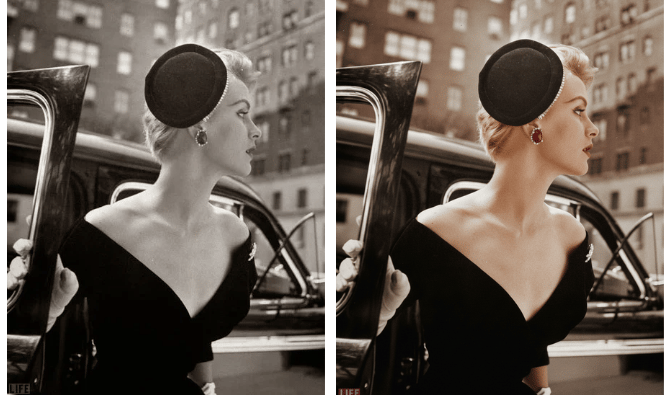
The Prompt:
Restore and colorize this photo.
What It Does:
Takes your old black and white family photos and brings them back to life with natural colors. Perfect for those precious memories from the 60s, 70s, or even earlier.
Best For: Old family photos, vintage pictures, damaged photos that need repair
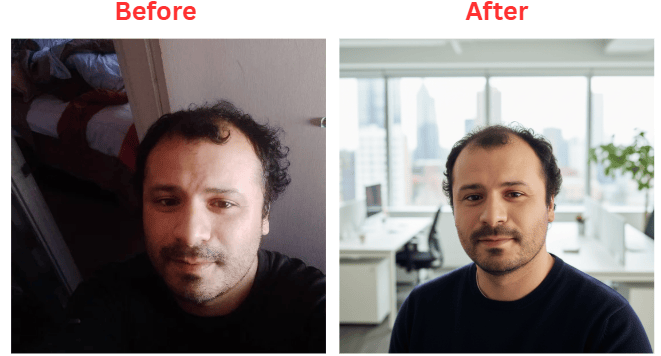
The Prompt:
Transform my selfie into a fresh but professional image suitable for a social media profile. The lighting should be natural, flattering, and multidimensional. My head is slightly tilted so it doesn't look stiff and it should look like I'm in a modern, bright office with a blurred background.
What It Does:
Turns your casual selfie into a polished, professional headshot that looks like it was taken in a real studio. The lighting is natural, and you won't look stiff or awkward.
Best For: LinkedIn profiles, business social media, professional networking, website bios
3. Cinematic Portrait (For That Hollywood Look)
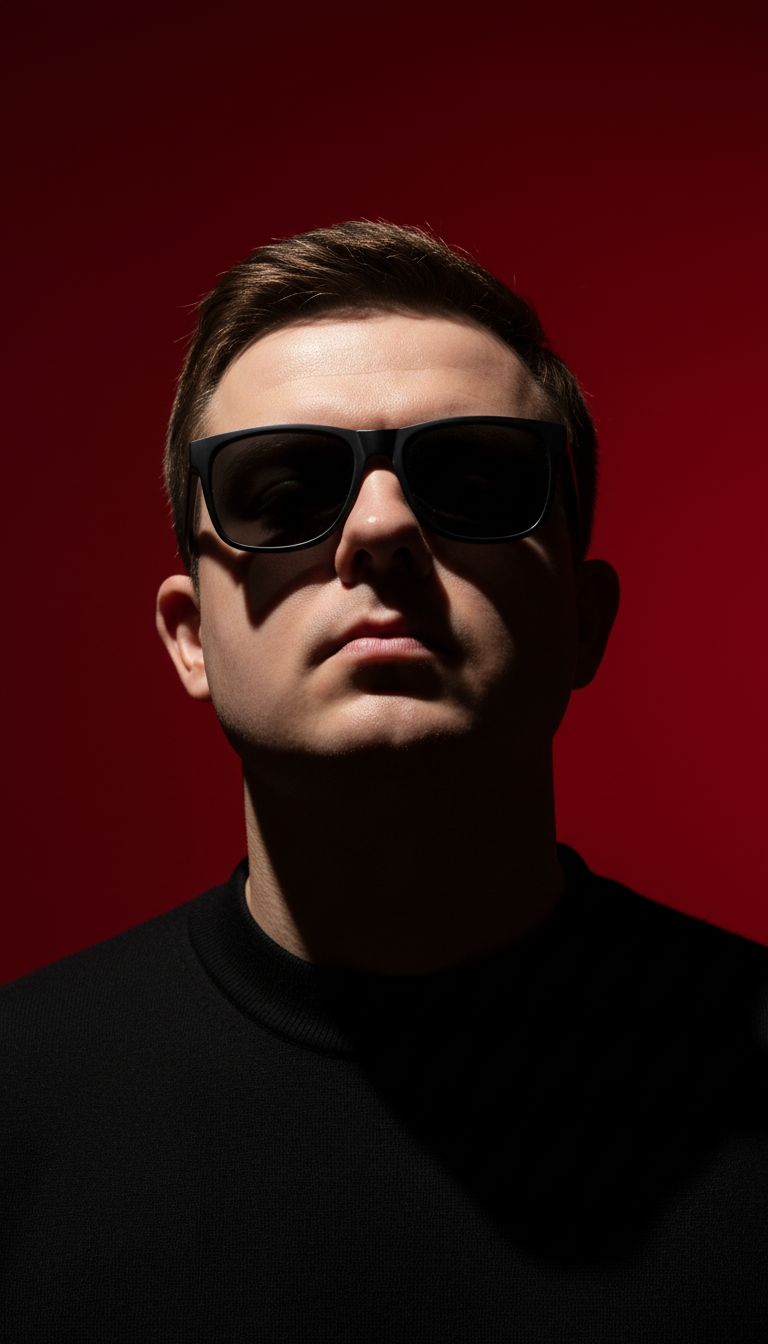
The Prompt:
Create a vertical portrait (1080x1920) shot, preserving the subject's exact facial features with stark cinematic lighting and high-contrast shadows. Capture from a slightly low, upward angle that emphasizes the jawline and neck, evoking dominance and sculptural elegance. Add jet black sunglasses. The backdrop should be a deep, saturated crimson red, clashing boldly with the subject's luminous skin tones and dark wardrobe. Make the composition hyper-dramatic, sleek, and gallery-worthy, and ensure it is visually striking, modern, and optimized for vertical display on Facebook for bold impact and professional polish.
What It Does:
Creates a dramatic, magazine-cover style portrait with movie-quality lighting. The angle makes you look powerful and confident, and the red background makes it pop on social media.
Best For: Instagram stories, Facebook posts, personal branding, creative profiles
4. 80s Style Makeover (Total Throwback Vibes)
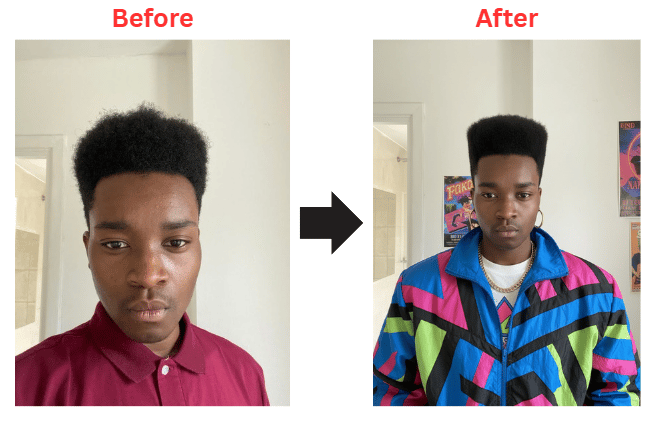
The Prompt:
First ask me to upload a selfie. Then generate an image using my selfie of me with an 80s style makeover.
What It Does:
Transforms you into an 80s icon with big hair, neon colors, and vintage fashion. It's fun, nostalgic, and gets tons of engagement on social media.
Best For: Fun social posts, themed parties, throwback content, viral-worthy pics
5. Try Different Hairstyles (Before You Actually Cut Your Hair!)

The Prompt:
Generate avatars of this person with different hairstyles in a 3x3 grid format.
What It Does:
Shows you 9 different hairstyles all at once so you can see what looks best before committing to a real haircut. Save yourself from bad haircut regrets!
Best For: Testing new looks, fun content, style exploration, decision-making
Quick Tips: Making These Prompts Work Even Better
You can play around with these prompts and be more specific with the output, but just make sure to follow these rules:
DO:
Be specific about lighting - Natural light, dramatic shadows, soft glow—details matter
Mention the exact resolution - Like 1080x1920 for Instagram stories or 1:1 for profile pics
Describe the background clearly - Blurred office, red backdrop, outdoor setting, etc.
Use quality words - Professional, cinematic, hyper-realistic, gallery-worthy
Upload high-quality photos - The better your original photo, the better your AI result
DON'T:
Don't be vague - "Make it look cool" won't work. Say exactly what you want.
Don't skip the negative prompts - Tell it what NOT to include (blurry, cartoonish, low quality)
Don't use tiny, pixelated photos - Start with the best quality image you have
Don't overload with too many requests - Pick 1-2 main things you want changed
Don't forget the aspect ratio - Different platforms need different sizes (vertical for Instagram, square for profile pics)
Which prompt are you most excited to try? Hit "Reply" and let me know!
Talk soon,
Brian
Reply